
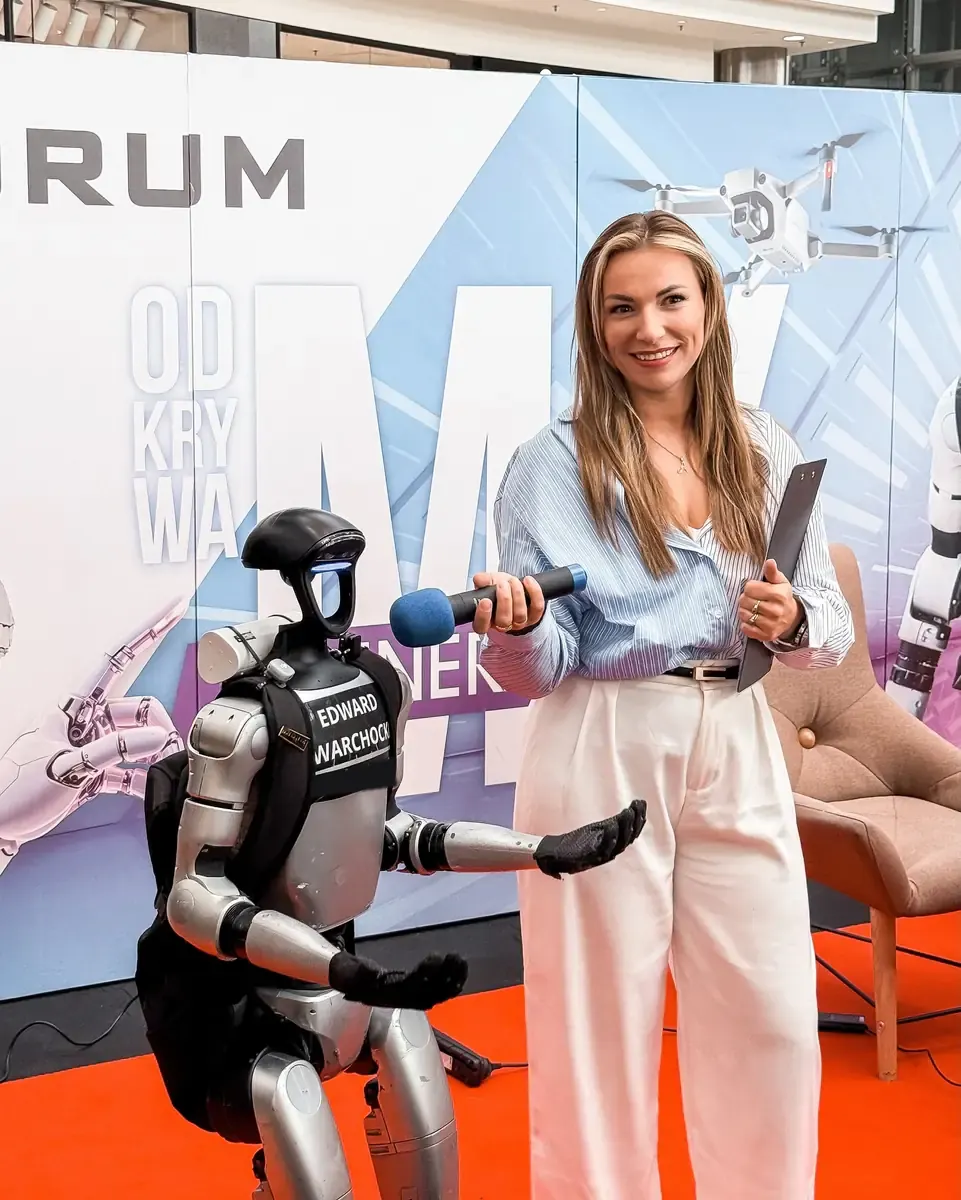
Robot host (emcee) for conferences and galas
A robot host that knows your event agenda.
A humanoid robot running MERA OS announces agenda items, joins panels and talks with the presenter, in your guests’ language too. A MERA operator can stop it at any moment.
- Agenda from the event profile
- MERA operator on site
- Over 70 languages
How it hosts
What a robot host does on stage
Your agenda goes into the event profile in MERA OS. Based on it, the robot hosts the event together with your presenter.
Announces agenda items
Using the agenda saved in the event profile, it introduces the next talks, panels and breaks.
Talks with the presenter
It holds a live conversation on stage with your presenter and answers questions.
Joins the panel
It can take part in a panel discussion and talk with the audience.
Knows your company and event
The event profile holds knowledge about your company and the agenda, so the robot talks about your brand and about what is happening on stage.
Photos and short videos
After the formal part it poses for photos with guests and can record short videos for social media.
Speaks your guests’ language
It talks in over 70 languages, with a voice matched to each language.
Example
What a programme with a robot host can look like
This is an example. We plan the running order and the robot’s moments with you, based on your agenda.
Opening
The robot welcomes guests from the stage and announces the first agenda item.
Between talks
It introduces the next speakers and talks with the presenter.
Panel
It joins the panel together with the presenter and panellists.
Questions from the floor
It talks with the audience live, in other languages too.
Break and closing
It announces the break or the close and poses for photos with guests.
Check dates
What are you planning?
3 short steps, under a minute. We will tell you if the robot is free and send a proposal.
Check availability
What happens next
- We check the robot’s availability on your date.
- We call or email to ask about the agenda and venue.
- We send a proposal with a quote.
No obligation. We reply within one working day.
Topics and operator
You decide what the robot says on stage
We agree the conversation rules before the event and save them in the event profile.
Tone and vocabulary
Before the event you agree the robot’s tone and vocabulary with us. They go into the event profile.
Topics it avoids
You list the topics the robot must not discuss, such as politics or competitors.
MERA operator on site
A MERA operator oversees the conversations and can stop the robot at any moment.
Checked before the event
We check every robot before it goes to an event, and we bring spare batteries.
Languages
Talking in your guests’ language
Conversations run on MERA OS, MERA Robotics’ own system: live voice, the robot’s persona and knowledge about your event.
- Over 70 languagesIncluding English and Polish, with a voice matched to each language (native accent).
- Persona and voiceThe robot can appear as Edward Warchocki or with your brand’s identity: its own name, character and way of speaking.
- Event knowledgeYour agenda and information about your company are in the event profile.
- Operator appA MERA operator controls the robot’s movement and gestures from a phone.
Preparation
Preparation step by step
Request
Fill in the form. We reply within one working day.
Agenda
You send the event agenda and materials about your company. We use them to build the event profile in MERA OS.
Tone and topics
We agree the tone, vocabulary and topics the robot avoids. These rules go into the event profile.
Languages and cues
We agree the conversation languages and the moments when the robot announces agenda items.
Event day
We bring a checked robot with spare batteries. A MERA operator oversees the event and can stop the robot at any moment.
Included
- Unitree G1 or H2 robot with MERA OS
- MERA operators on site
- Robot transport and spare batteries
- Event profile with your agenda and brand knowledge
- Conversation rules: tone, vocabulary and topics to avoid
What we need from you
- Your event agenda
- Materials about your company and brand
- Topics the robot should not discuss
- The languages the robot should speak
Video
See the robot talk live
Footage of Edward Warchocki: a street conversation, a festival and a TV performance.
FAQ
Questions about a robot host
Question not here? Add it in the form and we will answer with the proposal.
Check availabilityCan a robot host a conference or a gala?
Yes. A MERA robot can act as the event host: using the agenda saved in the event profile, it announces the next agenda items, joins panels and talks with the presenter and the audience.
How does the robot know the agenda?
Before the event you send us the agenda and materials about your company. We save them in the event profile in MERA OS, which the robot uses on stage.
Can the robot host together with a human presenter?
Yes. The robot talks with the presenter on stage and takes part in panels, and it can announce agenda items itself.
Can I decide what the robot must not talk about?
Yes. Before the event you agree the tone, vocabulary and topics the robot avoids, such as politics or competitors. These rules go into the event profile.
Who keeps the robot in check on stage?
A MERA operator oversees the conversations and can stop the robot at any moment. The operator also controls movement and gestures from a phone app.
Which languages can the robot host in?
MERA OS handles conversations in over 70 languages, including English and Polish, with a voice matched to each language. We agree the languages before the event.
Which robot should I choose for the stage?
For hire with an operator we have the Unitree G1 (about 132 cm tall) and the Unitree H2 (about 182 cm tall). The robot can appear as Edward Warchocki or with your brand’s identity.
How much does a robot host cost?
Each quote is individual and depends on how long the robot stays, the venue and logistics. Send us the date, city and agenda, and we will send a proposal.
Do you work outside Poland?
Yes. We work across Europe: in every European Union country and also in the United Kingdom, Switzerland and Norway, among others. In September 2026 a MERA robot with operators worked at an international trade fair in Cannes.
More
More about robots at events
- MERA EVENTS: humanoid robot hire for events
- Humanoid robot as a conference or gala host (MC): what it can do, how to prepare and the AI Act
- Edward Warchocki at your event
- How to rent a humanoid robot for an event: roles, process and requirements
- Humanoid robot rental with operators in Europe: how to choose a company
Your conference with a robot on stage.
Check whether the robot is free on your date. It takes under a minute.
Check availability